eobdtool

eobdtool
HOT
显示标签为“digiprog 3 update”的博文。显示所有博文

2015年8月12日星期三

Fix Digiprog 3 v4.94 firmware to read EEPROM dumps

Though DigiProg 3 is designed to work stand-alone for the sake of the large screen display, still some others turn to like PC operation. Is it possible to make DigiProg 3 odometer correction tool (current V4.94 version) connected to PC? Someone has tested it work and obdtoolshop.co.uk here is glad to share.

NOTE: We are not responsible for the damage.

First of all, dissemble the digiprog 3 v4.94 firmware PCB board
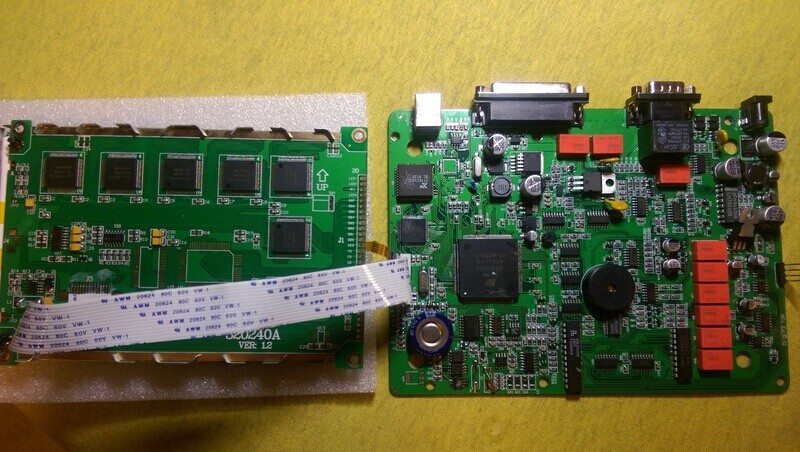

If you find your DP3 PCB is missing a FTDI chip marked red below, solder it with correct FTDI chip


With the FTDI FT232BL chip, you can connect digiprog3 with computer/laptop. The FTDI chip acts as the driver in device manager. You will not be able to transfer your read eeprom dumps to and from pc/laptop etc. You can save dumps to pc with it.


Solder the FTDI chip and works perfect. No problem with the drivers all installed by themselves.

Connect digiprogiii mileage correction master with PC and start operating.


2015年8月7日星期五

Digiprog 3 Update 4.94

You are available to Digiprog 3 Update 4.94 Service on obdtool.co.uk, which can update your old version Digiprog 3 software to the newest one with only €39.00.


How to update Digiprog3 V4.88 mileage correction tool to the newest V4.94?
1. Place an order for V4.94 Update Service, and leave your serial number on your order. Software will be sent via E-mail.
2. Of course, you also can directly buy the newest Digiprog 3 V4.94 Odometer Programmer.

Digiprog 3 V4.94 Video Guide:

Digiprog 3 Update 4.94 Tips:
1. Do not update the digiprog 3 online when you use;
2. Disable any anti-virus software on your computer before running an update;
3. Make sure your computer will not become standby status when updating. Computer power must be well connected. Update will take 15-20 minutes;
4. If your Digiprog 3 Serial Number is not 590C8F0E0000, 24CC65070000 or AFD68C070000, it might cause blue problem.
5.  Please confirm the update file is complete as display below, or will cause blue screen too.


If needed, you can browse through obdtool.co.uk Page to get more technical support on Digiprog 3.