eobdtool

eobdtool
HOT
显示标签为“digiprog 3 car list”的博文。显示所有博文

2015年9月2日星期三

Digiprog 3 DP3 clone V4.94 Software Update Service

Digiprog 3 odometer master clone has been updated to V4.94. If you have old version (V4.85, V4.88 etc) Diguiprog3, you can update the device at €39 free shipping.  By installing the DigiProg3 V4.94 update software, you can easily update the software to add more vehicle models and better performance. The update software is now available on obdtool.co.uk: http://www.eobdtool.co.uk/wholesale/digiprog-3-update-service.html

New DP3 4.94 adds following cars:
Audi
New version -A3
Ford
-F150 24C16
-Falcon 24C02
Mercedes
-W176 New version
-W204 New version Diag
-w212 new version of Diag
Opel
-Insignia New version
New version –Astra

How to install digiprog 3 4.94 update software? /How to update DP3 4.94 step-by-step?

Follow the video instruction to update Digiprog 3 to V4.94

Pre-upgrade tips:
1. Do not update the digiprog 3 online when you use;
2. Disable any anti-virus software on your computer before running an update;
3. Make sure your computer will not become standby status when updating. Computer power must be well connected. Update will take 15-20 minutes;
4. If your Digiprog 3 Serial Number is not 590C8F0E0000, 24CC65070000 or AFD68C070000, it might cause blue problem.
5.  Please confirm the update file is complete as display below, or will cause blue screen too.


Instructions:

Copy and paste Digiprog 3 patch and update video rar to desktop, then extract them
Mount on desktop, right click “Properties”
Click “Power”
Set “Turn off monitor” to “Never”
Set “Turn off hard disk” to “Never”
Set “System Standby” to “Never”

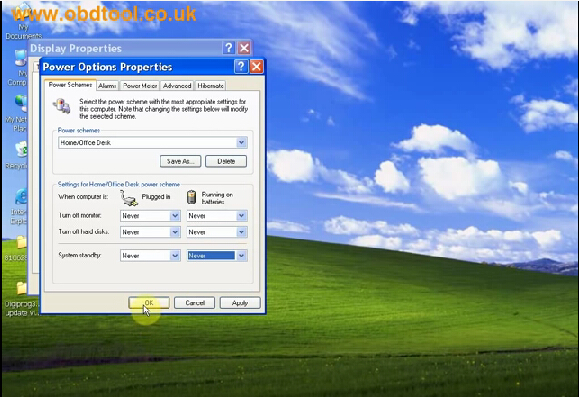

Set “Wait” value to “9999” minute
Connect DP3 mileage correction tool with computer via USB cable
Wait the system to detect driver
Browse file to C:/Document and Settings/Desktop/Digiprog3-4.94 update video/CDM 2.08.30 y86WHCL Certified
Click “Next”


Click “Finish” when driver is installed
Select “Install from a list of specific location (advanced)”, click “Next”
Click “Next”
Click “Finish”

Open 81C62817000-v4.94 patch folder on desktop
Open Mysterious girls 1.0


Then open My Computer>>Manager>>Device Manager>>Ports>> USB Serial Port (COM4) to check COM Port is set to COM4

Set COM port to “COM4” and filename “Digi1 bin”
Click on “Select the port and click me” button


Digiprog 3 4.94 update procedure is end
Click “OK”

Buy cheapest V4.94 digiprog3:


2015年8月7日星期五

How to tell different Digiprog Ⅲ Digiprog 3 V4.94 packages?

There are several different DigiProg 3 odometer correction tool packages available in eobd2.fr. What’s the different among Digiprog 3 SM47 series: SM47 to SM47-F? Please check the table list below:
Item No
SM47
SM47-B
SM47-D
SM47-E
SM47-F
Product Name


Software
V4.94
V4.94
V4.94
V4.94
V4.94
Language
Deutsch, English, Espanol, French, Portuguese, Italiano, Turkish, Nederlands.
Power-On password
1
1
1
1
1
Manufacturer
SM47 and SM47-B made by same manufacturer
SM47-D and SM47DZ made by same manufacturer
SM47-E and SM47-F made by same manufacturer
Package
Full package with ST01 and ST04 cable
Main unit and OBD2 cable
Full package
Full package
Main unit and OBD2 cable
Update
Via Email
Via Email
Via Email
Send back to factory to update
Vehicle coverage
Comprehensive
Vehicle coverage may slightly different from different manufacturers
Odometer correction way
The same as SM33 series, some need to dissemble the dashboard, some via OBD. Follow the system prompts.

DIGIPROG 3 FAQ:

About vehicle model:

Q: Does Digiprog III change mileage for BMW after 2008year? Does Digiprog3 make key for BMW?
A: Better use Digimaster 3 to program mileage for the high-end BMW. Digiprog3 can't make key for BMW, advice you use AK300 key pro.

Q: Does digiprog3 work with VW golf 6 2009, golf 5 2006 and Peugeot 407 2006?
A: Yes. Digiprog 3 does. Please refer to digiprog3 vehicle list at:

Q: I use digiprog3 (item No.SM33-C) to work with Opel Astra 2004, and the manual suggests use No.1 cable, this cable is ST01?
A: Yes, No.1 cable is ST01 cable, and the software needs to open off-line programming or online-programming.

About device and accessories:

Q: what is Digiprog III power-on password?
A: Digiprog 3 Power-on password is 1. After enter password "1",
click tick" √"not " X", otherwise Digiprog3 will freeze.

Q: What is ST01, ST04 cable used for in the package of Digiprog 3 (SM33-C)?
A: It needs to remove chip when you program mileage for some car models. One end of the ST01 cable and ST04 cable clip the chip, and the other end connect to digiprog3.

Q: What is the difference between tacho pro 2008 and digiprog 3?
A: Tacho pro 2008 and digiprog 3 share the same function. But tacho pro works with the car before 2006 year, digiprog 3 works with the car even up to 2012 year.

Q: Can I use Digiprog3 (item No.SM33) ST01 cable and ST04 cable to work with Yanhua brand Digiprog 3(item No.SM33-B)?
A: Yes, you can, but Yanhua brand Digiprog 3(item No.SM33-B) is better use this following adapter in the package, it works better and more stable.


Uplander 08 mileage via digiprog 3 V4.94 pinout and cable number

Problem: I have one digiprog 3 v4.94 version, and want to do 2008 Uplander 9S12H256 but it’s not in the menu. I need pinout or picture of connection and cable number.

SOLVED! It went well, its St48 cable, colors marked in pic below. Set type to eeprom/MCU/9s12. Read processor, save file, double check original mileage calc with tachosoft (Uplander 2008 9S12H256), manually change the file and write. Bingo!


2015年8月6日星期四

Volvo V50 Tachometer correction with digiprog 3 (fixed)

Problem before entering:

I am trying to change mileage on Volvo V50 2004 dash with digiprog 3 odometer master clone v4.94.

I have downloaded a German version user manual and soldered 3 wires as shown in German manual (checked pin numbers). Adapter 51 has 4 wires. Pin 25 (white on original, or orange on clone) left unsoldered. I'm getting "ERROR INIT" message on screen. Processor is MC9S12DG128B. I selected HCS12 in digiprog 3.

What I'm doing wrong? Then I contacted my dealer. The obdtool.co.uk technician helped solve the trouble. It should work for whom has DP3 on this dash.

I checked the Volvo V50 HCS12 user manual with digiprog iii again, and noticed that at least 4 wires, vss, vdd, tx and rx should be soldered.

I posted the attachment they provided.


VOLVO V50 TACHO
1. Remove and disassemble tachometer.
2. Connect as shown in the photo above the plug 51 with the marked soldering points. 3. PICTURES on the following page
4. Select the program: cars / trucks -> VOLVO -> V50 HCS12.
5. The DIGIPROG displays the old / wrong Mileage.
6. Program and completed the new / correct Mileage.


NOTE: Pin-signal= end of white wire in first picture


The job needs good soldering/ desoldering skill. Lucky, the problem was settled.